
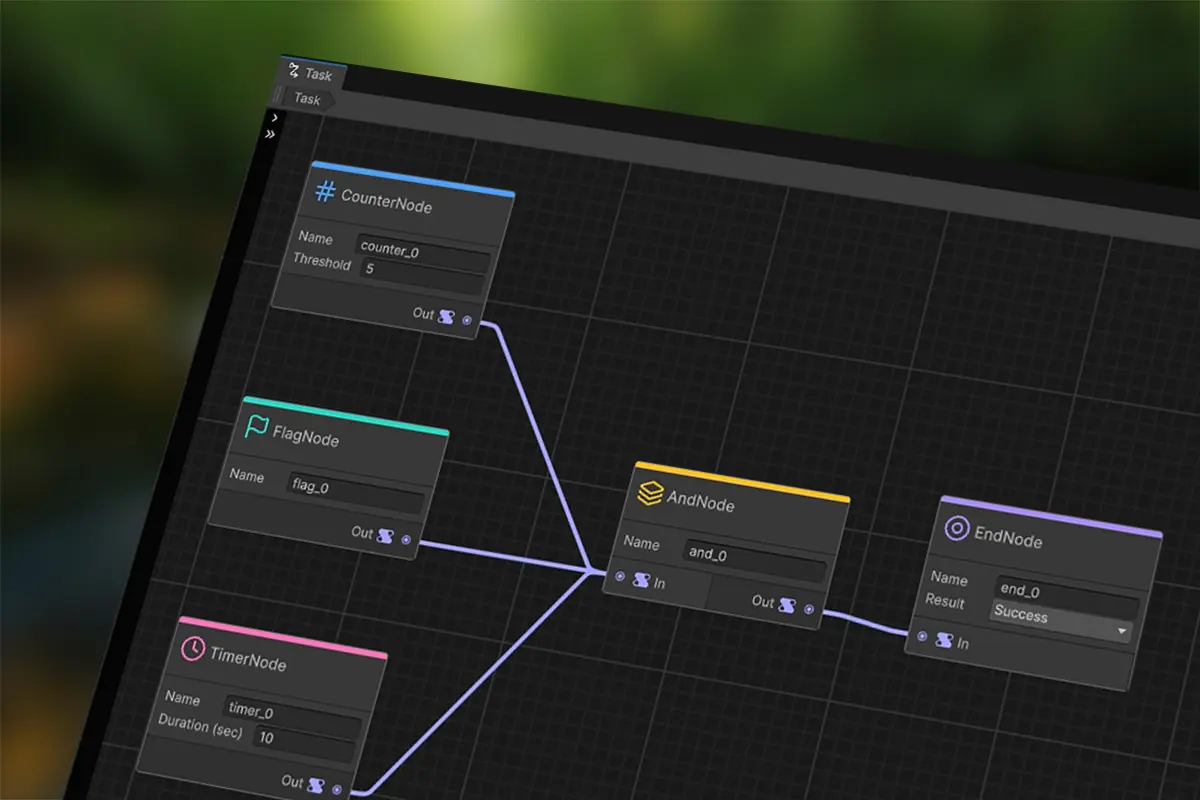
XR Task System was born from a universal pain point in XR industrial training: task logic is usually hard-coded with endless if-else statements, and every change is a slow engineering slog. When instructors or product managers want to adjust a training step, developers have to modify code, repackage, and redeploy — iteration speed grinds to a halt. This tool liberates task logic from code and puts it into visual node graphs, so non-programmers can configure tasks independently.
Product Overview
XR Task System is a visual task graph plugin built on Unity 6's official Graph Toolkit, designed specifically for XR industrial training scenarios. Describe task logic using six semantic nodes — drag and connect to complete your task configuration. No more hard-coded state machines, no more scattered if-else blocks.
Built on a clean three-layer separation architecture — Editor, Importer, and Runtime are completely independent. Runtime has zero editor dependencies, minimizing build size. The queue-driven state propagation algorithm stably supports 1000+ nodes without stack overflow, handling everything from simple step checks to complex multi-branch maintenance training.
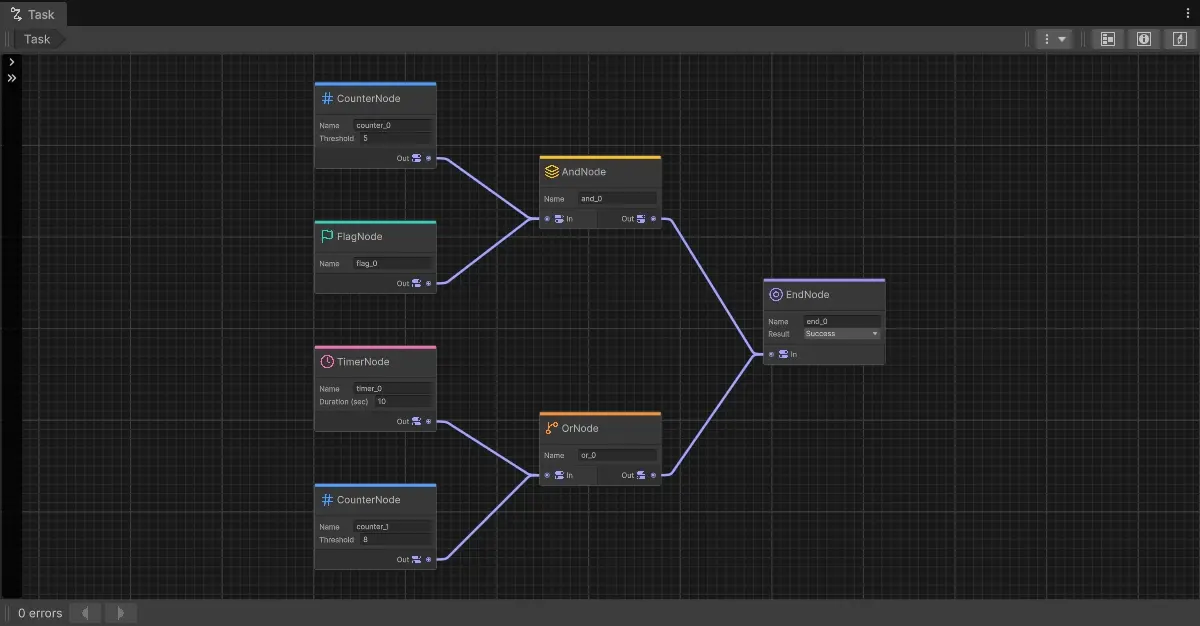
Node Types
Six semantic nodes, carefully selected to cover 80% of XR training scenarios — no more, no less. Leaf nodes detect conditions, middle nodes combine logic, and the End node determines the final result.
Core Features
A visual task graph editor built on Unity 6's official Graph Toolkit — not reinventing the wheel, but following the official standard approach.
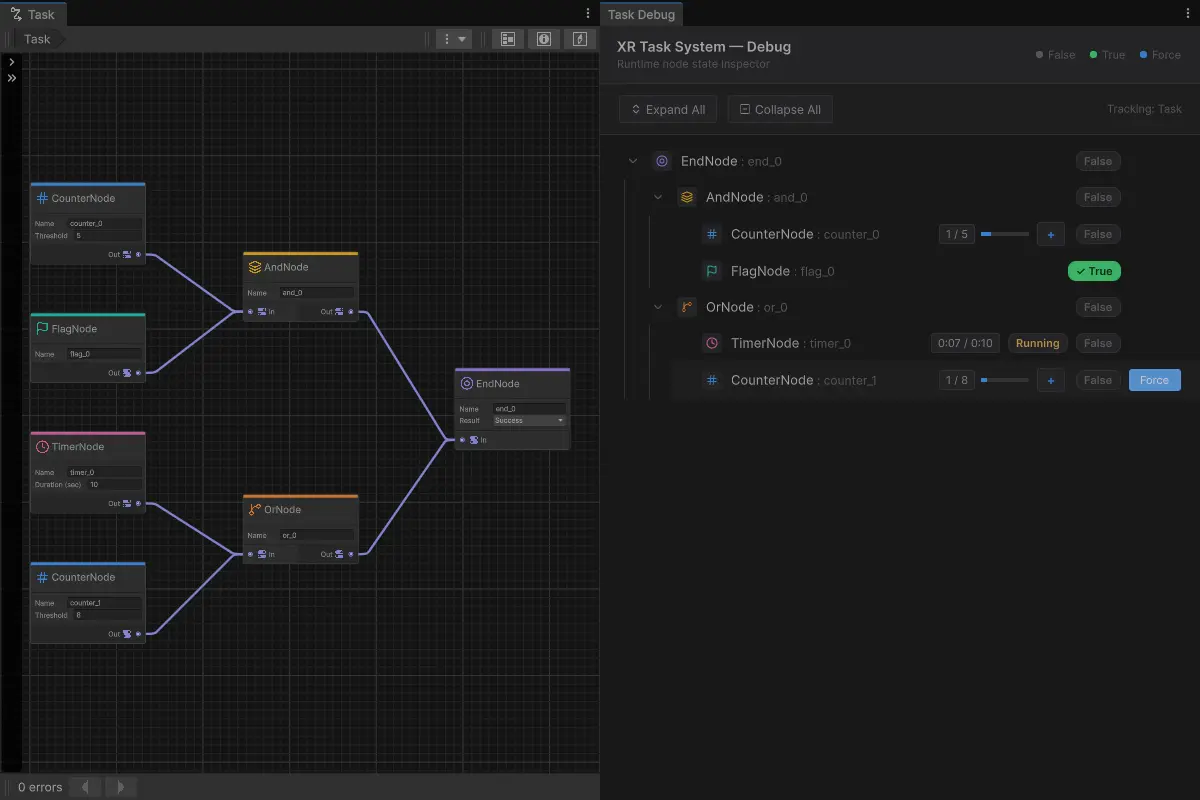
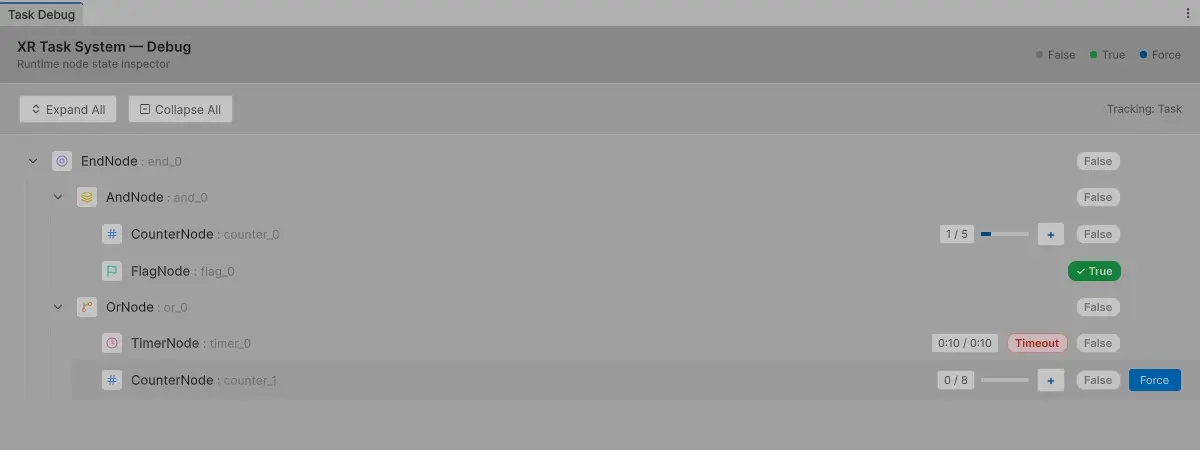
The real-time debug window displays all node states in a tree structure — green for True, gray for False. See exactly which step your task is on at a glance, no more logging or breakpoints.
An interactive debugging experience — one-click +1 for Counter, one-click Start for Timer, and any node can be forced to True. Skip earlier steps and directly test the step you care about.
Queue-driven propagation — 1000+ nodes run stably with zero stack overflow. From simple step checks to complex multi-branch training, one system handles it all.
Event-based external interface — integrate with your XR logic in one line of code, no architecture changes needed.
Auto light/dark theme switching — the debug window automatically follows the Unity editor theme for comfortable viewing.
At a Glance
Technical Specifications
Supported Unity Versions: Unity 6 (Graph Toolkit 0.4.0-exp.2 and above).
Render Pipeline: All pipelines (no specific SRP dependency, pure editor tool).
Supported Platforms: Windows, macOS (editor side); runtime supports all Unity XR platforms.
Asset Format: .xrtask scripted import, graph-based serialization.
Integration: C# event-based API — attach component, load task graph, subscribe to events.
.xrtask asset baking · serialization · data format conversionQuick Integration
Three steps, about five minutes. No architecture changes needed — attach component, load graph, subscribe to events — it's that simple.
// 1. Get the component
TaskSystemComponent taskSystemComponent = GetComponent<TaskSystemComponent>();
if (taskSystemComponent != null && taskSystemComponent.Runtime != null)
{
    // 2. Get the runtime
    TaskGraphRuntime runtime = taskSystemComponent.Runtime;

    // 3. Subscribe to events
    runtime.Completed += (isSuccess, endName) =>
    {
        Debug.Log($"Completed's isSuccess: {isSuccess}, endName: {endName}");
    };

    runtime.NodeStateChanged += (nodeId, nodeName, oldState, newState) =>
    {
        if (oldState == newState) return; // filter no-op changes
        Debug.Log($"NodeStateChanged's nodeId: {nodeId} , nodeName: {nodeName} , oldState: {oldState}, newState: {newState}");
    };

    runtime.AndProgressChanged += info =>
    {
        Debug.Log($"AndNode.Name: {info.Name}, TrueCount / TotalCount: {info.TrueCount} / {info.TotalCount}, Progress: {info.Progress}");
    };

    if (runtime.TryGetAndProgress("phase_one_complete", out var now))
    {
        Debug.Log($"TryGetAndProgress's phase_one_complete: TrueCount / TotalCount: {now.TrueCount} / {now.TotalCount}, Progress: {now.Progress}");
    }

    // Drive nodes from your XR logic
    runtime.IncrementCounter("screws_installed");
    runtime.SetFlag("panel_opened", true);
    runtime.StartTimer("phase_one");
}
Debug Window
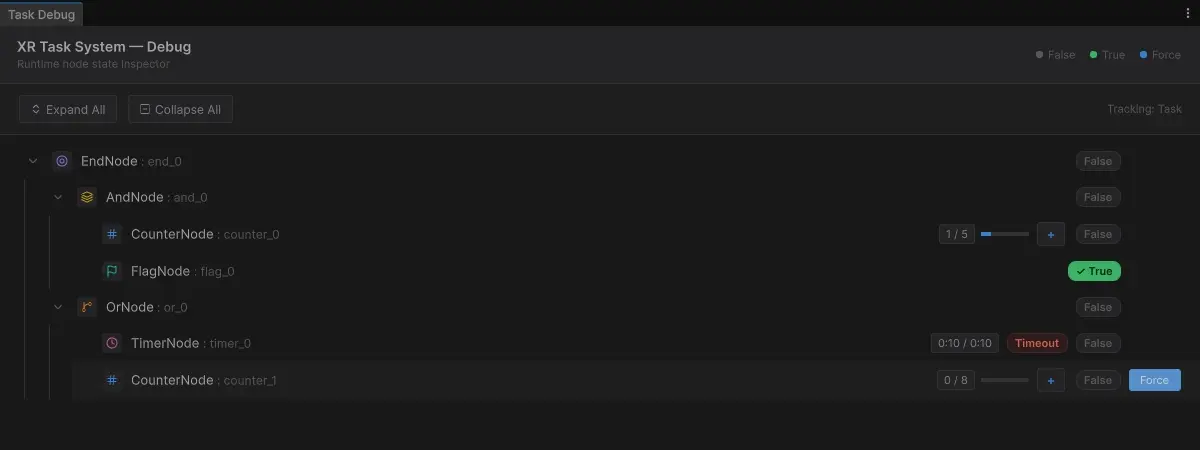
The built-in Task System Debug window displays each node's state in real time with a tree structure that supports collapsing and expanding. Counter nodes have an Increment button, Timer nodes have Start and Force buttons, and any node can be forced to True for quick validation. The window also automatically switches between light and dark themes to match the Unity editor.
Performance & Reliability
XR Task System uses a queue-driven state propagation algorithm instead of recursive traversal, ensuring zero stack overflow even with task graphs of 1000+ nodes.
The runtime assembly does not depend on the editor — it only references UnityEngine.CoreModule, resulting in a lighter build size.
Each node's state change triggers an event, making it easy to integrate with XR logic, UI, or data analytics systems.
Roadmap
Expanding the node library with spatial trigger nodes (area triggers, grab interactions) and structural nodes (sub-tasks, sequence nodes).
Adding example scenes for common training scenarios — from simple step checks to complete maintenance workflows.
Continuously incorporating community feedback to refine product details.
Get Started
A mature editor tool born from real enterprise-level VR training projects, with approachable pricing and an easy learning curve.